


Any computer geeks?


Registered User
Joined: Mar 2004
Posts: 688
Likes: 0
From: Maineville, Ohio
You know, I was watching TV tonight (something I do about once a month or so) and saw a Geek Squad commercial involving VW bugs and jet packs.... 
It seems we have some network techs, some IT professionals, some wannabes, but "Geek", aside from Hoss, is just not something we have here on this site....
Jack, still waiting on pictures before we have to send the "Geek Squad" after you.....
It seems we have some network techs, some IT professionals, some wannabes, but "Geek", aside from Hoss, is just not something we have here on this site....
Jack, still waiting on pictures before we have to send the "Geek Squad" after you.....

1st Generation Admin
Joined: Jan 2005
Posts: 4,601
Likes: 118
From: Buies Creek, NC
Originally Posted by Bart Timothy
Are all those machines linked together in a LAN? What are you using for KVM? That's a very interesting setup.
KVM ~
For simple stuff, I use RealVNC from Cambridge/AT&T.
When I need to roll up my sleeves; each rig has on-board video and LAN (100Mbps/full duplex) . . .. hold that thought.
My main monitor has an A/B switchable VGA input, though most of the time I use the small monitor shown in the image. I've also a mini USB keyboard (just for the farm) that has a built-in Hub that I plug the USB mouse in.
With that, I can simply plug in the VGA and USB cable(s) to whatever rig when needed.
A poor man's KVM so to speak.

The rigs run neckid as cases cost money and get in the way of cooling and maintenance. All the rig's grounding is done via the standard ATX PSU's. To date, I've never had any problems with the lack of RF shielding.

Registered User
Joined: Jun 2002
Posts: 774
Likes: 1
From: West Jordan, Utah
Originally Posted by Jim Lane
I learned long ago to always get the best first or at least get the high end products and you cannot go wrong. There has to be a difference between a $250.00 motherboard and one that goes for $59.00, it only makes since.
I get most of my parts from Fry's Electronics in Industry Ca.
I know they are higher priced than mail order but I have had bad experiences with the mail order stuff. I always get an extended warranty on the boards CPU, hard drives and memory because it is an instant exchange for the life of the warranty and I always trade up.
Right now at home I have 5 desktop computers and 1 Fujitsu wide screen laptop on my network. I have my new computer and the server share a Sony 20" LCD monitor through a KVM.
The 2 surveillance system DVR server both share a LCD monitor through a KVM on the same desk. I built a 3.0 Ghz computer for my daughter for her games that is also on the network.
The surveillance DVR is a 16-channel 480 fps system and will record for 1 month before it rewrites.
It watches the property through 8 day/night cameras and is supplemented with infrared illuminators so it can see in total darkness.
The house is wired for Ethernet with an access point for my laptop if I want to go wireless.
Oh I also have a HP Ipaq 4705 I take in my truck.
Jim
I get most of my parts from Fry's Electronics in Industry Ca.
I know they are higher priced than mail order but I have had bad experiences with the mail order stuff. I always get an extended warranty on the boards CPU, hard drives and memory because it is an instant exchange for the life of the warranty and I always trade up.
Right now at home I have 5 desktop computers and 1 Fujitsu wide screen laptop on my network. I have my new computer and the server share a Sony 20" LCD monitor through a KVM.
The 2 surveillance system DVR server both share a LCD monitor through a KVM on the same desk. I built a 3.0 Ghz computer for my daughter for her games that is also on the network.
The surveillance DVR is a 16-channel 480 fps system and will record for 1 month before it rewrites.
It watches the property through 8 day/night cameras and is supplemented with infrared illuminators so it can see in total darkness.
The house is wired for Ethernet with an access point for my laptop if I want to go wireless.
Oh I also have a HP Ipaq 4705 I take in my truck.
Jim
I buy from small local hardware wholesalers when ever possible because the service is much better, and I don't have to carry any inventory to maintain my customers.
Your home system sounds very simular to mine, except I've only got a 4 channel DVR. Every room of my home is wired with Cat5e, phone and coax. I have 2 broadband connections, and use a dual WAN router, running to a 16 port layer 3 managed switch and a 802.11a/g access point. The LAN is over kill for the most part, but is needed for the times when my lab is full of computers in for repair, or new system burn-in.
I use a Panasonic CF-M34 Toughbook in my truck for GPS, playing mp3's, and an occasional "war drive".
Registered User
Joined: Jun 2002
Posts: 774
Likes: 1
From: West Jordan, Utah
Originally Posted by BC847
All share a single ADSL connection through a server rig running MS ICS. Said connection is spread around via a 24 port switch
KVM ~
For simple stuff, I use RealVNC from Cambridge/AT&T.
When I need to roll up my sleeves; each rig has on-board video and LAN (100Mbps/full duplex) . . .. hold that thought.
My main monitor has an A/B switchable VGA input, though most of the time I use the small monitor shown in the image. I've also a mini USB keyboard (just for the farm) that has a built-in Hub that I plug the USB mouse in.
With that, I can simply plug in the VGA and USB cable(s) to whatever rig when needed.
A poor man's KVM so to speak.
The rigs run neckid as cases cost money and get in the way of cooling and maintenance. All the rig's grounding is done via the standard ATX PSU's. To date, I've never had any problems with the lack of RF shielding.
KVM ~
For simple stuff, I use RealVNC from Cambridge/AT&T.
When I need to roll up my sleeves; each rig has on-board video and LAN (100Mbps/full duplex) . . .. hold that thought.
My main monitor has an A/B switchable VGA input, though most of the time I use the small monitor shown in the image. I've also a mini USB keyboard (just for the farm) that has a built-in Hub that I plug the USB mouse in.
With that, I can simply plug in the VGA and USB cable(s) to whatever rig when needed.
A poor man's KVM so to speak.
The rigs run neckid as cases cost money and get in the way of cooling and maintenance. All the rig's grounding is done via the standard ATX PSU's. To date, I've never had any problems with the lack of RF shielding.
Does each machine have a hard drive or are you booting through the NIC or some other device? What are the OS's?
Cool!!


Registered User
Joined: Mar 2003
Posts: 5
Likes: 0
From: Meriden Connecticut
Originally Posted by FiverBob
ALTOS machine with 8080 processor.
5K of Ram at 10 cycles/sec
10M hard drive
2 - 7-1/2" floppies
9600 modem
Running MPM
Do I need something else????
BehindTheTimesBob
5K of Ram at 10 cycles/sec
10M hard drive
2 - 7-1/2" floppies
9600 modem
Running MPM
Do I need something else????
BehindTheTimesBob

Thread Starter
Administrator


Joined: Nov 2004
Posts: 4,084
Likes: 235
From: Southern California
Originally Posted by Pentastar
That modem is way more than you need for the processor you are running.

Jim

Registered User
Joined: Mar 2003
Posts: 1,787
Likes: 0
From: Central VT
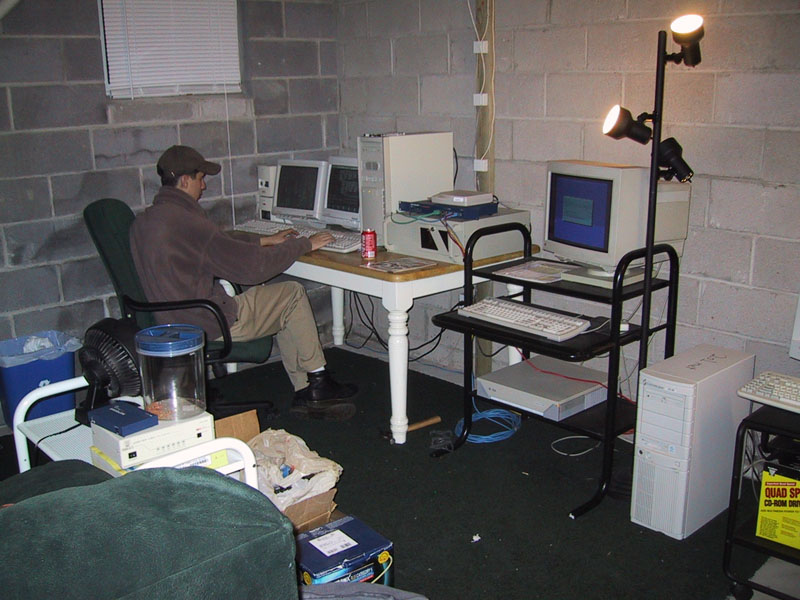
This is from 1999. After working at Concentric and not being happy with the service we provided the customers, I started up a hosting company with my friend (pictured). Started off with a 1.5mbps SDSL line into the house. We had our very own /24 which back then I think they still called a "Class C" at the time. Left is some old Athlon K5 DNS box, the 4U was the main server, a P3 866 Coppermine (ftp/web), the Sparc did logging and the Gateway 2000 P90 labeled "2o1.net" a qmail server running vpopmail/vmailmgr whatever. All ran Slackware. We ended up eventually consolidating it into 1 box and colocating it and then later eventually just selling off the client base. I don't have much interest these days... rather be driving my truck or working on it or something.

Thread
Thread Starter
Forum
Replies
Last Post