


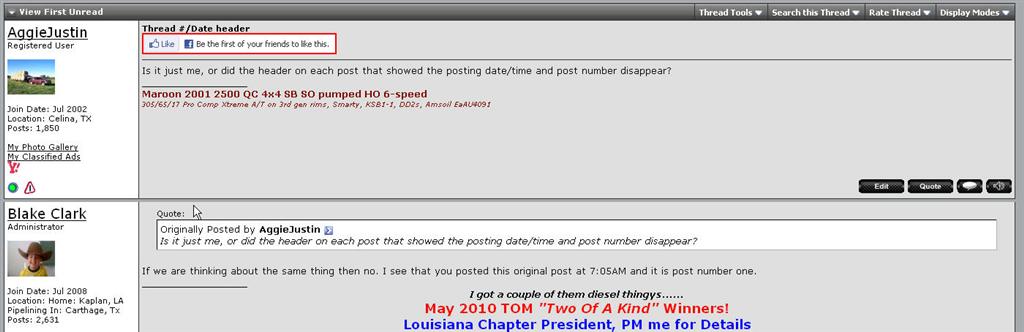
Thread #/Date header


Administrator / Severe Concussion Aficionado
Joined: Jul 2008
Posts: 5,491
Likes: 15
From: Home: Kaplan, LA - Pipelining In: Pecos, Tx


Trending Topics

Administrator
Joined: Jan 2004
Posts: 2,331
Likes: 2
From: Kalamazoo, Michigan
That's weird. I'm using the latest Firefox version and I HAVE the date/time. What I DON'T have is the ability to see if any new replies have been made to a thread in each category list. Everything shows as being read. Been that way for me for 6 months or better now.
Administrator / Severe Concussion Aficionado
Joined: Jul 2008
Posts: 5,491
Likes: 15
From: Home: Kaplan, LA - Pipelining In: Pecos, Tx

Now for you. You are always here so of course no knew threads.

Thread Starter
Registered User
Joined: Jul 2002
Posts: 2,242
Likes: 16
From: Celina, TX
OK, I'm back. Right after I posted this morning, I lost my internet connection at the house. They finally got it restored just a little bit ago.
I'm running Firefox 3.6.10, which I think is the latest release since it just ran an update not long ago. I cleared my cache earlier while doing maintenance when I couldn't get online.
The header is there if I connect using IE7, but Firefox is my primary browser.
I think this just started yesterday (or at least that's when I noticed it). At first I thought it might have just be a site upgrade that changed the look, but then I realized what was missing.
I'm running Firefox 3.6.10, which I think is the latest release since it just ran an update not long ago. I cleared my cache earlier while doing maintenance when I couldn't get online.
The header is there if I connect using IE7, but Firefox is my primary browser.
I think this just started yesterday (or at least that's when I noticed it). At first I thought it might have just be a site upgrade that changed the look, but then I realized what was missing.

DTR Founder


Joined: May 2002
Posts: 4,931
Likes: 14
From: Raleigh, NC
OK, I'm back. Right after I posted this morning, I lost my internet connection at the house. They finally got it restored just a little bit ago.
I'm running Firefox 3.6.10, which I think is the latest release since it just ran an update not long ago. I cleared my cache earlier while doing maintenance when I couldn't get online.
The header is there if I connect using IE7, but Firefox is my primary browser.
I think this just started yesterday (or at least that's when I noticed it). At first I thought it might have just be a site upgrade that changed the look, but then I realized what was missing.
I'm running Firefox 3.6.10, which I think is the latest release since it just ran an update not long ago. I cleared my cache earlier while doing maintenance when I couldn't get online.
The header is there if I connect using IE7, but Firefox is my primary browser.
I think this just started yesterday (or at least that's when I noticed it). At first I thought it might have just be a site upgrade that changed the look, but then I realized what was missing.
Thread Starter
Registered User
Joined: Jul 2002
Posts: 2,242
Likes: 16
From: Celina, TX
Nothing in the past couple of weeks. I'll try the update to 3.6.11 and see if that clears anything up. Otherwise, I'll try turning off the most recent plug-ins to see if anything changes.
Thread Starter
Registered User
Joined: Jul 2002
Posts: 2,242
Likes: 16
From: Celina, TX
Well, not sure exactly what resolved it, but the headers are back.
I updated to 3.6.11 and that didn't fix it. I turned off my recent add-ons and the headers came back. I turned them back on one-by-one to see what would cause them to disappear and they never did.
Odd...
Thanks for the help guys!
I updated to 3.6.11 and that didn't fix it. I turned off my recent add-ons and the headers came back. I turned them back on one-by-one to see what would cause them to disappear and they never did.
Odd...
Thanks for the help guys!

Advocate of getting the ban button used on him...
Joined: Aug 2005
Posts: 5,082
Likes: 9
From: Live Oak Texas
I still don't see it. I updated the 3.6.whatever today in FireFox. My browser cache is cleared every time I close the browser. Nothing else on my computer has changed. 