


GPS - What works for the oilfield?


Thread Starter
Chapter President
Joined: Feb 2002
Posts: 6,102
Likes: 2
From: Red Deer, Alberta Canada
 GPS - What works for the oilfield?
Hey guys.. I know quite a lot of our chapter has oilfield operators and the like so I was wanting some input on a GPS unit. I have been balking it for years as I have always been good with a map and directions from the operators on site "turn left at the barking dog, go over a couple culverts and turn right at the white fence post". But recently its becoming normal for the planners to send me details with coordinates and a brief map. Anyone out west of Caroline will know how many roads that criss-cross the countryside. The cost is coming down for these things and they seem way more reliable.
My question is what unit works the best for these areas? Can they be upgraded to use LSD's? I travel areas from NE BC down to central SK.
Any input is appreciated.
My question is what unit works the best for these areas? Can they be upgraded to use LSD's? I travel areas from NE BC down to central SK.
Any input is appreciated.

With age comes the cage
Joined: Jul 2007
Posts: 2,710
Likes: 3
From: The Gas Patch
Here is some ideas for you "Up There"
This is the chart-plotter I have mounted in my buggy that is made by Lowrance.. The larger screen (5"x5") is
nice when your driving. I intend on installing one of these in the work truck that I take to "the patch" as well.
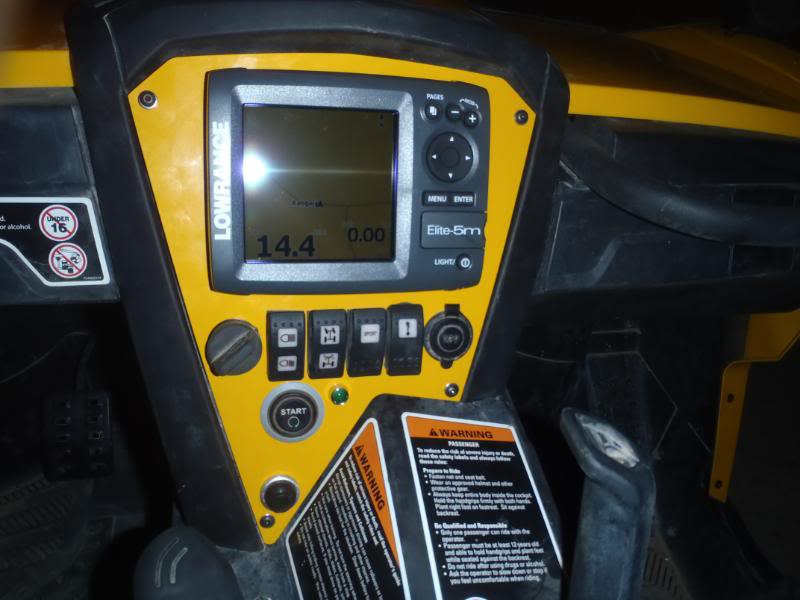
You can flush mount or gimble mount the system. The only draw-back to the system is it requires
a 12 volt supply. Therefore it is not portable like the hand held system with a smaller screen.
Link to Lowrance:
http://www.lowrance.com/+
You can download the emulator for the Elite-5 and try it on your computer here:
http://www.lowrance.com/en/Downloads/Product-Emulators/
Here is the software for your "Up There" LSD's
http://www.scadalink.com/locator/index.html
Curious to see what other tech gear / software is out there that can be used "Down Here" as well.
This is the chart-plotter I have mounted in my buggy that is made by Lowrance.. The larger screen (5"x5") is
nice when your driving. I intend on installing one of these in the work truck that I take to "the patch" as well.
You can flush mount or gimble mount the system. The only draw-back to the system is it requires
a 12 volt supply. Therefore it is not portable like the hand held system with a smaller screen.
Link to Lowrance:
http://www.lowrance.com/+
You can download the emulator for the Elite-5 and try it on your computer here:
http://www.lowrance.com/en/Downloads/Product-Emulators/
Here is the software for your "Up There" LSD's
http://www.scadalink.com/locator/index.html
Curious to see what other tech gear / software is out there that can be used "Down Here" as well.
Last edited by Colo_River_Ram; Jul 28, 2011 at 05:46 PM. Reason: more info added
Thread Starter
Chapter President
Joined: Feb 2002
Posts: 6,102
Likes: 2
From: Red Deer, Alberta Canada
Wow..  That's pretty high tech..
I was wondering more about the Garmin stuff, or others but that certainly is cool and honestly I have never heard of Lowrance. The SCADA link software is neat too..
So anyone else? What do you other guys use?
That's pretty high tech.. I was wondering more about the Garmin stuff, or others but that certainly is cool and honestly I have never heard of Lowrance. The SCADA link software is neat too..
So anyone else? What do you other guys use?

Registered User
Joined: Apr 2005
Posts: 757
Likes: 0
From: Calgary/Alta
 .
.

Registered User
Joined: Aug 2002
Posts: 406
Likes: 0
From: Alberta.......
I've got a cheapy Garmin nuvi250 with a oilfield-specific SD card-can't remember right now if it's PatchMap or Oiltrax....I think Oiltrax. The LSD location feature takes you right to the middle of the actual LSD, not specifically to a wellsite/plant, but if you can get to the LSD, you should be able to find your site....  Have never punched in coordinates, but I know it has the capability. Amazing how many backtrails are shown in the factory map-I have had it west of Caroline camping (Swan Lake) and IIRC every road there showed. The ETA it shows is deadly accurate-it changes as your speed changes, you stop, etc. If you want, I can try to hook up with you next time I'm in RD and you can have a look at it.
Jason
Have never punched in coordinates, but I know it has the capability. Amazing how many backtrails are shown in the factory map-I have had it west of Caroline camping (Swan Lake) and IIRC every road there showed. The ETA it shows is deadly accurate-it changes as your speed changes, you stop, etc. If you want, I can try to hook up with you next time I'm in RD and you can have a look at it.Jason

Registered User
Joined: Aug 2002
Posts: 1,257
Likes: 0
From: Sundre, Alberta
I use a Garmin GPSmap 60CX for everyday use and find it's pretty much dead on for what I need it for.
It's been discontinued but they are still available at Wal-Mart and Wholesale Sports.
It uses an SD card, is compatible with with most PC programs, color screen, customizable for the various screens.
I had an old Magellan mounted on the dash since 02 and this Garmin replaced it about 2 years ago and it's logged every mile since.
It's a simple handhelds with a ton of features and the accessory support is typical Garmin, everything you need is available.
Jeff
It's been discontinued but they are still available at Wal-Mart and Wholesale Sports.
It uses an SD card, is compatible with with most PC programs, color screen, customizable for the various screens.
I had an old Magellan mounted on the dash since 02 and this Garmin replaced it about 2 years ago and it's logged every mile since.
It's a simple handhelds with a ton of features and the accessory support is typical Garmin, everything you need is available.
Jeff
Trending Topics
Thread Starter
Chapter President
Joined: Feb 2002
Posts: 6,102
Likes: 2
From: Red Deer, Alberta Canada
Cool. I was looking at the Garmin stuff on the website and was thinking it was capable of most of what I wanted.
I remember now talking about that SD card stuff with you J last time we had lunch, like 3 years ago.
Thanks Jeff, I think I will poke around some more for the models.
I remember now talking about that SD card stuff with you J last time we had lunch, like 3 years ago.
Thanks Jeff, I think I will poke around some more for the models.

Registered User

Joined: Jul 2003
Posts: 2,069
Likes: 0
From: Lloydminster, Alberta, Canada
I use the stuff from these guys with good success and service has been great (talk to an actual person):
http://www.rocandatech.com/home.php
http://www.rocandatech.com/home.php
With age comes the cage
Joined: Jul 2007
Posts: 2,710
Likes: 3
From: The Gas Patch
There GPS should be top notch as Lowrance makes some wicked broadband radar for boats as my uncle swears by it---not cheap by any means but his boat radar has no "dead spots" and even picks up birds sitting on the water in front of his boat---pretty much drive the boat though a maze with just the radar.Brolaw GPS usually has us driving around in circles but is a cheap one.
.Plus the fact all of the components can be networked together (I realize that is not needed here) and tied to the auto-pilot. You can buy engine sensors and monitor the engine vitals with them. The big screen is nice when your driving down the road watching for a COG change..
Most GPS units have similar functions / controls the larger format makes it easier on the fingers . I just got back from a ride, it is so accurate that it showed me what side of the road my 60" wide machine was on a two track trail and no I was not going put put


The Guru
Joined: Jan 2004
Posts: 6,589
Likes: 0
From: Airdrie Canada
I run the stock nav system in my 2010, it works ok. I have to convert the LSD to GPS.
http://www.baseloc.com/dls/
Works good. I also run an garmin nuvo in the older truck. Sure beats being lost.
http://www.baseloc.com/dls/
Works good. I also run an garmin nuvo in the older truck. Sure beats being lost.

Registered User
Joined: Sep 2010
Posts: 85
Likes: 0
From: Edmonton Alberta
I use an IPhone App called PrairieLocator, it's a buck in the App Store.
It converts LSD's and plots the location on Google maps, only catch is if you get out off cellphone range it can't update the map as the maps aren't located on the IPhone.
Otherwise it works great, specially for that price.
It converts LSD's and plots the location on Google maps, only catch is if you get out off cellphone range it can't update the map as the maps aren't located on the IPhone.
Otherwise it works great, specially for that price.

Registered User
Joined: Jan 2008
Posts: 74
Likes: 2
From: Edmonton, Alberta
You could check out these guys http://www.skybase.ca/ I am in the ag industry and use their Agmaps and it works great. Gives you LSD locations and if you just enter in a land location it will guide u right to it.
Thread Starter
Chapter President
Joined: Feb 2002
Posts: 6,102
Likes: 2
From: Red Deer, Alberta Canada
Thanks guys..
What got me thinking was that my Blackberry can do GPS, but my phone is a little too old. I downloaded an app called GPSed and it has a tracker software in it that gives you your location, elevation etc as well as how many satellites its using, the highest I had was 7. Problem is with my old phone its not very reliable and the sync is horrible.
The online software is neat that lets you plot your progress on a map and attach photos. however your screen on the phone has none of that, just a grid and your track.
What got me thinking was that my Blackberry can do GPS, but my phone is a little too old. I downloaded an app called GPSed and it has a tracker software in it that gives you your location, elevation etc as well as how many satellites its using, the highest I had was 7. Problem is with my old phone its not very reliable and the sync is horrible.
The online software is neat that lets you plot your progress on a map and attach photos. however your screen on the phone has none of that, just a grid and your track.
Registered User
Joined: Aug 2002
Posts: 1,257
Likes: 0
From: Sundre, Alberta
Jason,
I think a standard hand held GPS will do just fine for what you are wanting.
The Garmin that is sitting on my dash, if I remember will hold about a 1000 waypoints, and 50 routes or something along those lines.
I average seeing 10 to 12 satellites at all times and that is with it sitting on the dash, an external antennae will apparently lock me into all 12.
The factory loaded road map is almost nuts on for accurate, at least the main highways and a portion of the secondary stuff. A lot of secondary stuff doesn't come up but you can save those as your own "tracks". It even lists small rail sidings and roads that are not even on modern maps!
For the LSD waypoints you program into it as you go to them, etc will have to be "adjusted" name wise so you don't clutter up the screen. As you "mark" a waypoint or position, the unit names it 001, 002, 003 etc. You can rename them as well as change the icon to whatever you want but the screen will get busy so you will have to come up with something that works for you. Leaving them as numbers and having an external list might work for you.
In my case for example, all my Superpass sites are just labeled Fuel1, Fuel2, etc using a gas pump icon. I don't need to find them, I just want them to show up on the screen. Each waypoint does have an accessible description menu with an area for your info input, Long & Lat, date created, elevation, etc, etc. Of course, the more positions you mark, you just zoom the view in to open the everything up and keep the clutter down. I believe the zoom levels go from 100 meters out to 120 kilometers.
I'm thinking more along the lines of keep it simple but that works for me in this case anyways.
I was in Red Deer the other day, I should have chased you down for a chin wag and a cup of mud while we sat in the truck and pushed buttons on the GPS like little kids.
Jeff
I think a standard hand held GPS will do just fine for what you are wanting.
The Garmin that is sitting on my dash, if I remember will hold about a 1000 waypoints, and 50 routes or something along those lines.
I average seeing 10 to 12 satellites at all times and that is with it sitting on the dash, an external antennae will apparently lock me into all 12.
The factory loaded road map is almost nuts on for accurate, at least the main highways and a portion of the secondary stuff. A lot of secondary stuff doesn't come up but you can save those as your own "tracks". It even lists small rail sidings and roads that are not even on modern maps!
For the LSD waypoints you program into it as you go to them, etc will have to be "adjusted" name wise so you don't clutter up the screen. As you "mark" a waypoint or position, the unit names it 001, 002, 003 etc. You can rename them as well as change the icon to whatever you want but the screen will get busy so you will have to come up with something that works for you. Leaving them as numbers and having an external list might work for you.
In my case for example, all my Superpass sites are just labeled Fuel1, Fuel2, etc using a gas pump icon. I don't need to find them, I just want them to show up on the screen. Each waypoint does have an accessible description menu with an area for your info input, Long & Lat, date created, elevation, etc, etc. Of course, the more positions you mark, you just zoom the view in to open the everything up and keep the clutter down. I believe the zoom levels go from 100 meters out to 120 kilometers.
I'm thinking more along the lines of keep it simple but that works for me in this case anyways.
I was in Red Deer the other day, I should have chased you down for a chin wag and a cup of mud while we sat in the truck and pushed buttons on the GPS like little kids.
Jeff